
Features
What is in the register
ImproveDesk is deliberately opinionated. The data model follows the ITIL 4 continual improvement practice, and the rules that make the numbers defensible are enforced by the app rather than left to convention.
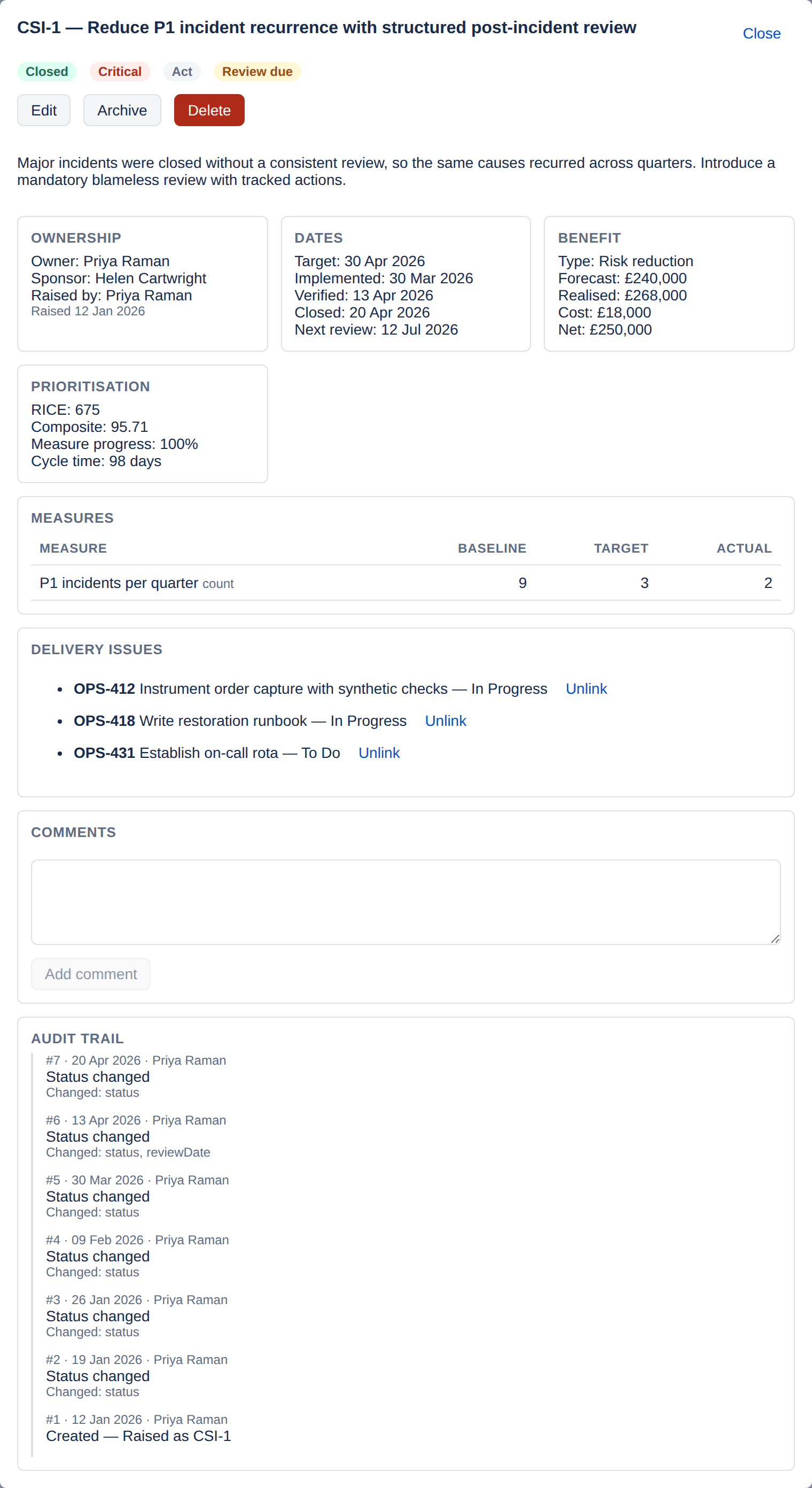
The record
Every improvement, fully described
One record holds the whole story: where the opportunity came from, who owns it, what it is worth, how it will be measured, and which Jira issues deliver it.
| Field | What it holds |
|---|---|
| Reference | Project-scoped and sequential — CSI-1, CSI-2 — allocated by the app, never by the client. |
| Title and description | What the opportunity is, and what evidence prompted it. |
| Source | Where it came from: incident, major incident review, problem, change review, service review, customer feedback, survey, internal or external audit, management review, risk assessment, staff suggestion, supplier review, or other. |
| Category and service | Your own category list, configured per project, and the service affected. |
| Owner, sponsor and raised by | Accountability. Owner and sponsor are Jira accounts; raised by is stamped by the server. |
| Priority | Critical, high, medium or low. |
| Target date and review date | When it is due, and when its benefit is next reviewed. |
| Benefit case | Type, forecast value, realised value, cost estimate and a narrative. |
| Measures (KPIs) | Baseline, target and actual per measure, with correct handling of lower-is-better measures such as MTTR and incident volume. |
| Prioritisation inputs | Reach, impact, confidence and effort size for RICE. The composite score needs nothing extra: it reads the benefit case, the effort size and the priority, weighted by the project’s value, effort and risk weights. |
| Linked Jira issues | The delivery work that implements the improvement. |
| Tags and standard references | Free-text tagging, and the clause you are evidencing. |
| Risks and dependencies | What could stop it. |
The register
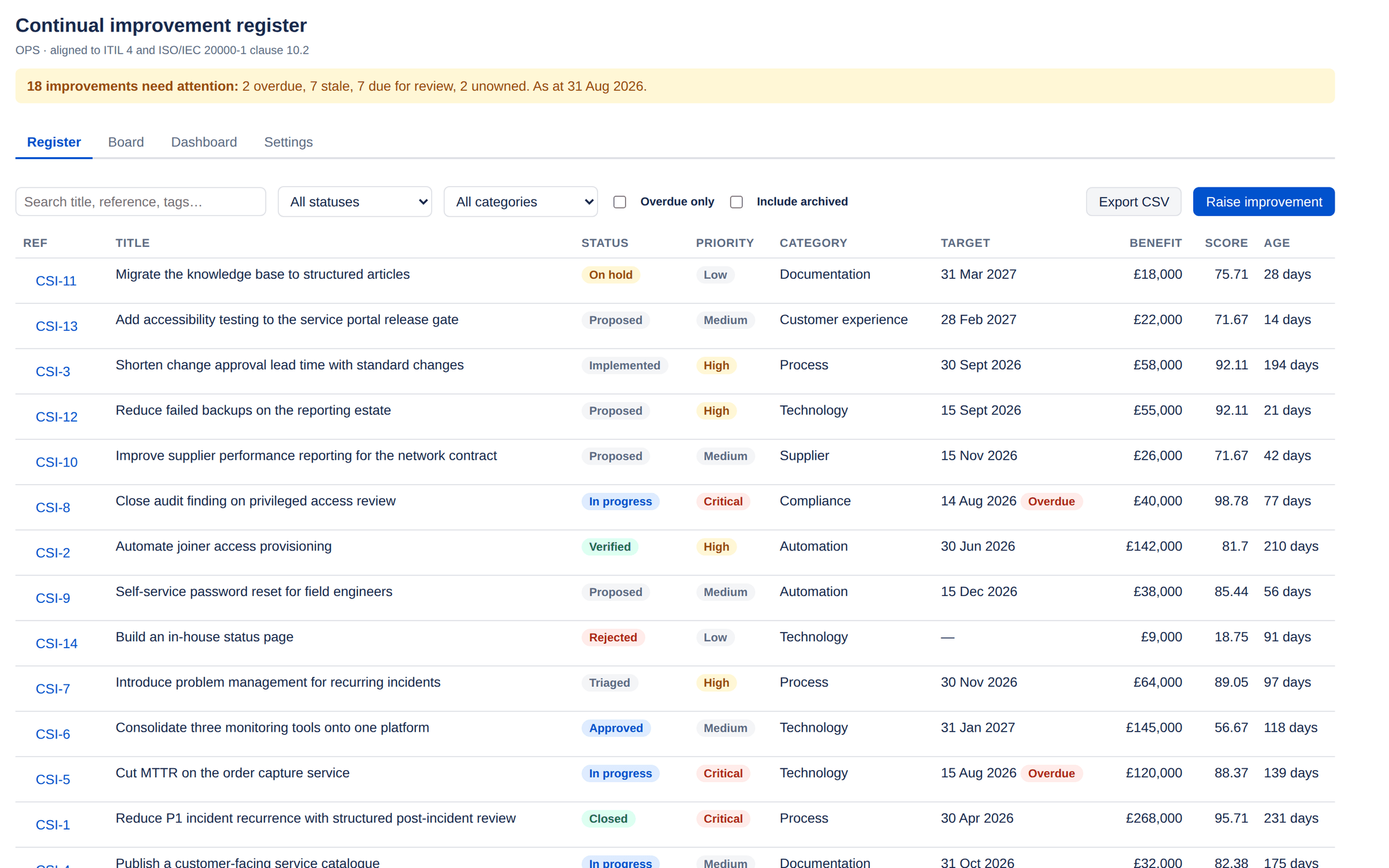
Find the improvement you are talking about
Filter by status, category or overdue state, and search across titles, references, tags and linked issue keys. Filtering is applied consistently across the whole predicate set rather than split across storage indexes, so the count you see is the count that exists.
- Search is debounced, so typing does not flood the register with requests
- Archived records are hidden until you ask for them
- Overdue is derived, not a field somebody has to maintain
- Export the current filtered view to CSV
Prioritisation
RICE and a composite score
RICE multiplies reach, impact and confidence and divides by the effort implied by the t-shirt size. Alongside it, a composite score combines the benefit case, the effort size and the record's priority, using weights you set per project.
An unscored improvement returns nothing, not zero. A record nobody has sized is never ranked alongside work that has been genuinely assessed as low value.
Benefits realisation
Forecast, realised, cost, net
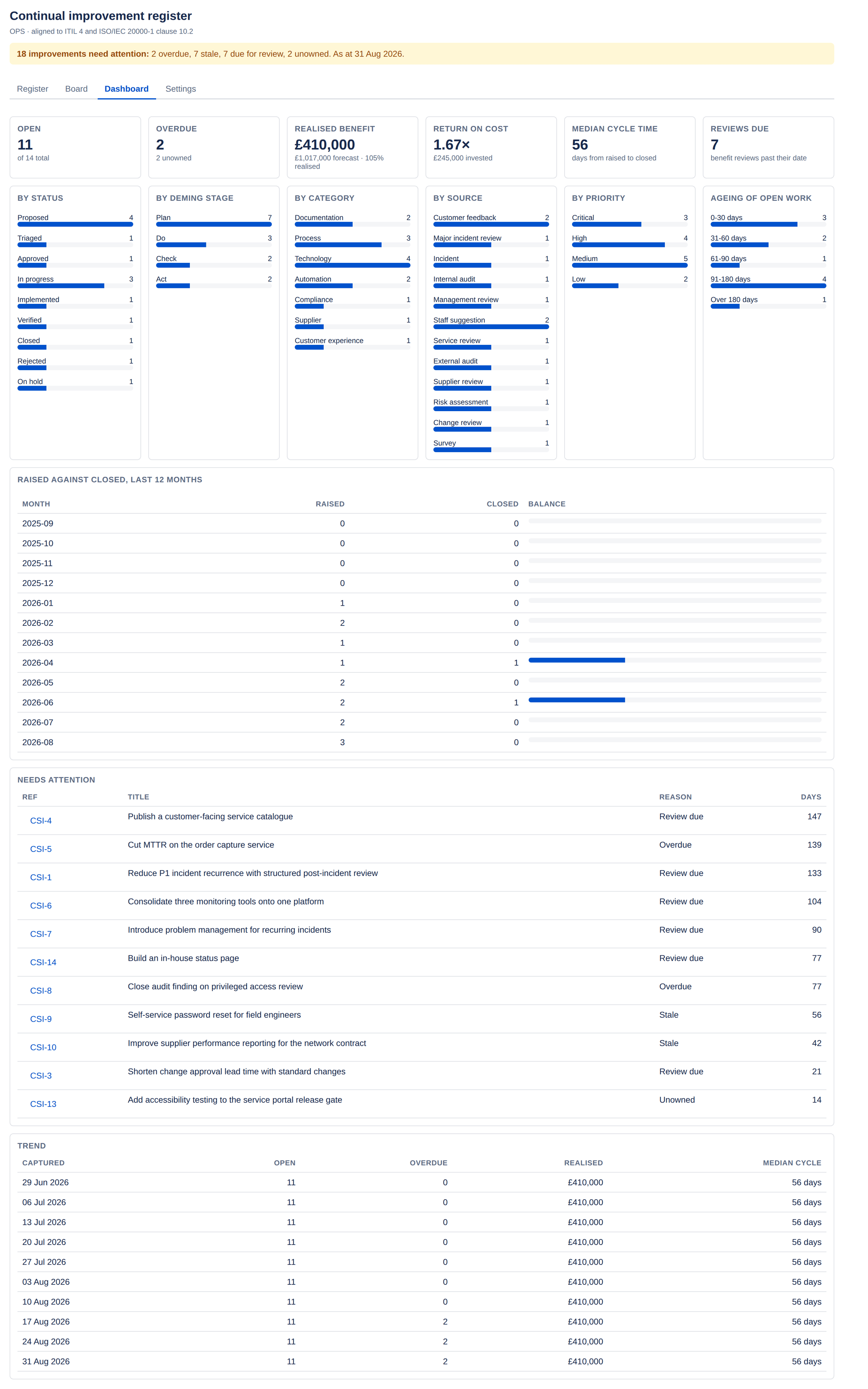
Each improvement carries a benefit case. The dashboard rolls these into realisation rate, return on cost and net benefit — but counts realised benefit only from records that reached verified or closed.
Benefit types
Measures
Lower is better, when lower is better
Each measure carries a baseline, a target and an actual. MTTR, incident volume and change lead time all improve as they fall — so ImproveDesk asks whether a measure is lower-is-better and computes progress accordingly. A measure that has gone the wrong way shows as negative progress rather than quietly reading as an improvement.
| Measure | Baseline | Target | Actual | Direction |
|---|---|---|---|---|
| P1 incidents per quarter | 9 | 3 | 2 | Lower is better |
| Mean provisioning time (hours) | 26 | 4 | 5 | Lower is better |
| Change lead time (days) | 12 | 3 | 4 | Lower is better |
| First-contact resolution (%) | 61 | 80 | 74 | Higher is better |
Automation
The register tells you when it has stopped moving
Daily attention sweep
A scheduled job recounts each project's attention figures every day: what is overdue, what has gone stale, what is due for review and what has no owner. The register shows them as a banner — 2 overdue, 1 with no owner — and the email digest can send them out.
Weekly KPI snapshot
A second job persists the dashboard figures each week, which is what the trend is drawn from. Without it a dashboard can only ever show today.
A run log, as evidence
Every scheduled execution is recorded, successful or failed. If a sweep stops working, an empty run log proves the handler never completed — attention figures that have stopped advancing otherwise look exactly like a healthy backlog.
Absence is treated as evidence. The register banner states the age of the last sweep. A silent scheduled job is one of the few failures a user cannot see, so ImproveDesk surfaces it rather than letting it hide.
Publishing to Jira issues
Search the register from Jira
A project administrator can tick Publish improvement status onto linked Jira issues in Settings. ImproveDesk then writes a small status record onto every issue the project's improvements link to, and Jira indexes it — so Jira search, filters and reports can ask about the register without anybody opening it. It is off for every project until somebody turns it on.
An issue can deliver more than one improvement, so the record is a roll-up across every improvement linking it: how many there are, their statuses and PDCA stages, the highest priority among them, the earliest review date, and whether any is overdue.
What is left out is the point. No names, no account ids, no references, no titles and no benefit figures. The record can be read by anyone who can browse the issue and by the other apps on your site, and the settings page says so above the checkbox rather than after it.
- Switching it on publishes the register already in the project; a large one is finished by the next daily reconciliation
- A daily reconciliation rebuilds each issue's record and repairs any that has drifted
- Switched off, the reconciliation removes what was published — or Remove published data does it straight away
- The search fields carry nobody's name, so they answer questions about the work, not about a person
| Search field | What it matches |
|---|---|
improvedeskCount | How many improvements link the issue. |
improvedeskStatus | Every status across them — an issue can carry more than one. |
improvedeskStage | Every PDCA stage across them: plan, do, check or act. |
improvedeskPriority | The highest priority across them. |
improvedeskNextReview | The earliest review date across them, as a whole day. |
improvedeskOverdue | The word "true" or "false" — quote it in a query. |
Queries worth copying
improvedeskCount >= 1Every issue the project publishes to. Start here.improvedeskOverdue = "true"Delivery work on an improvement that has passed its target date.improvedeskNextReview <= endOfMonth()Improvements due a review this month.improvedeskCount > 1Issues several improvements are relying on.
Dashboard gadget
One project's register on a Jira dashboard
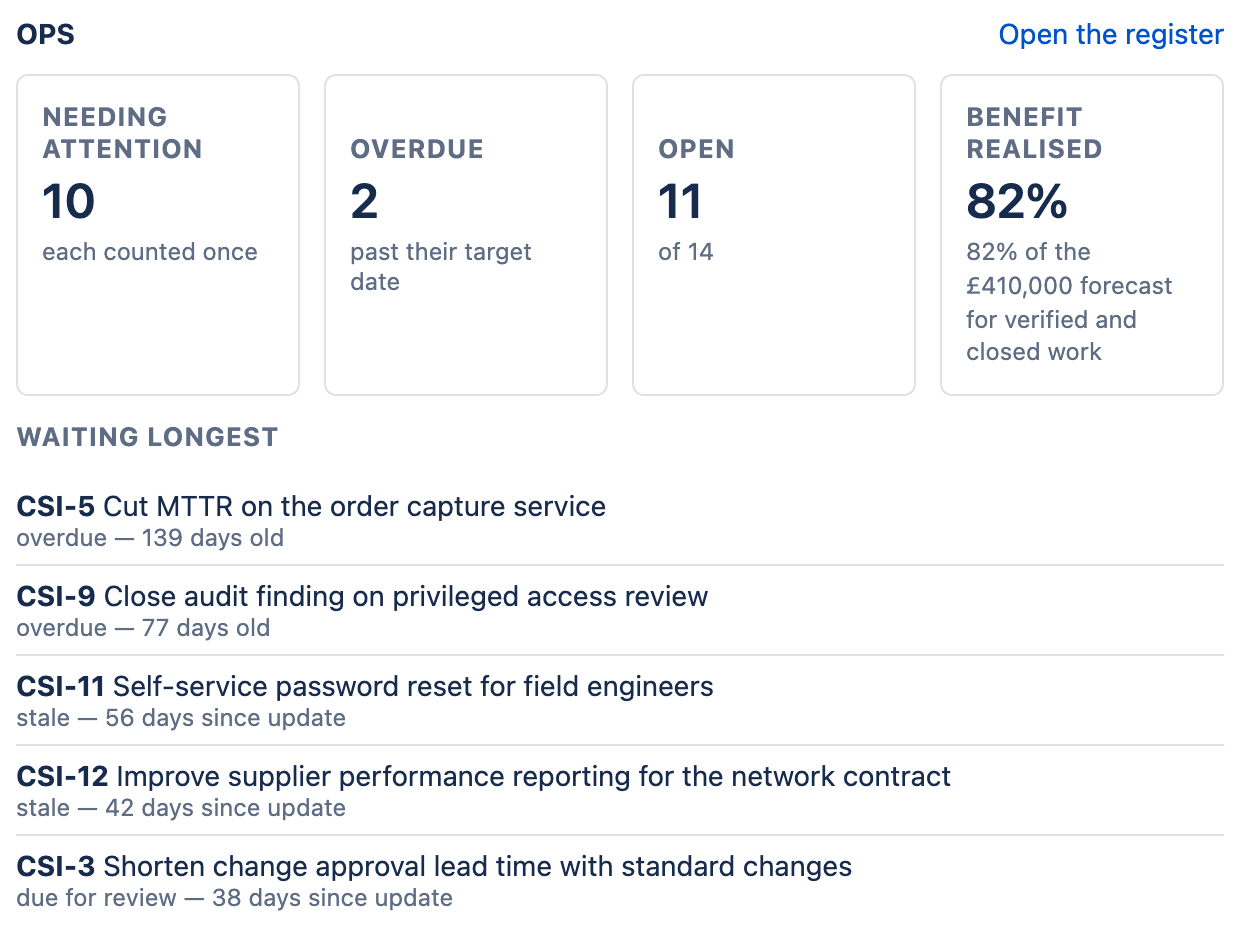
Add the ImproveDesk gadget to any Jira dashboard and choose a project. It shows four figures — improvements needing attention, each counted once; overdue; open, out of the total; and benefit realised — and the five improvements that have waited longest, each with the reason it needs attention. Open the register takes the reader straight to the project.
- The editor chooses from projects that have a register and that they can browse
- Every viewer is checked against the project, every time the gadget loads
- A viewer without access sees a sentence saying so, not the figures
- Worked out by the same calculation as the register's own dashboard
Email attention digest
What needs attention, in the inbox
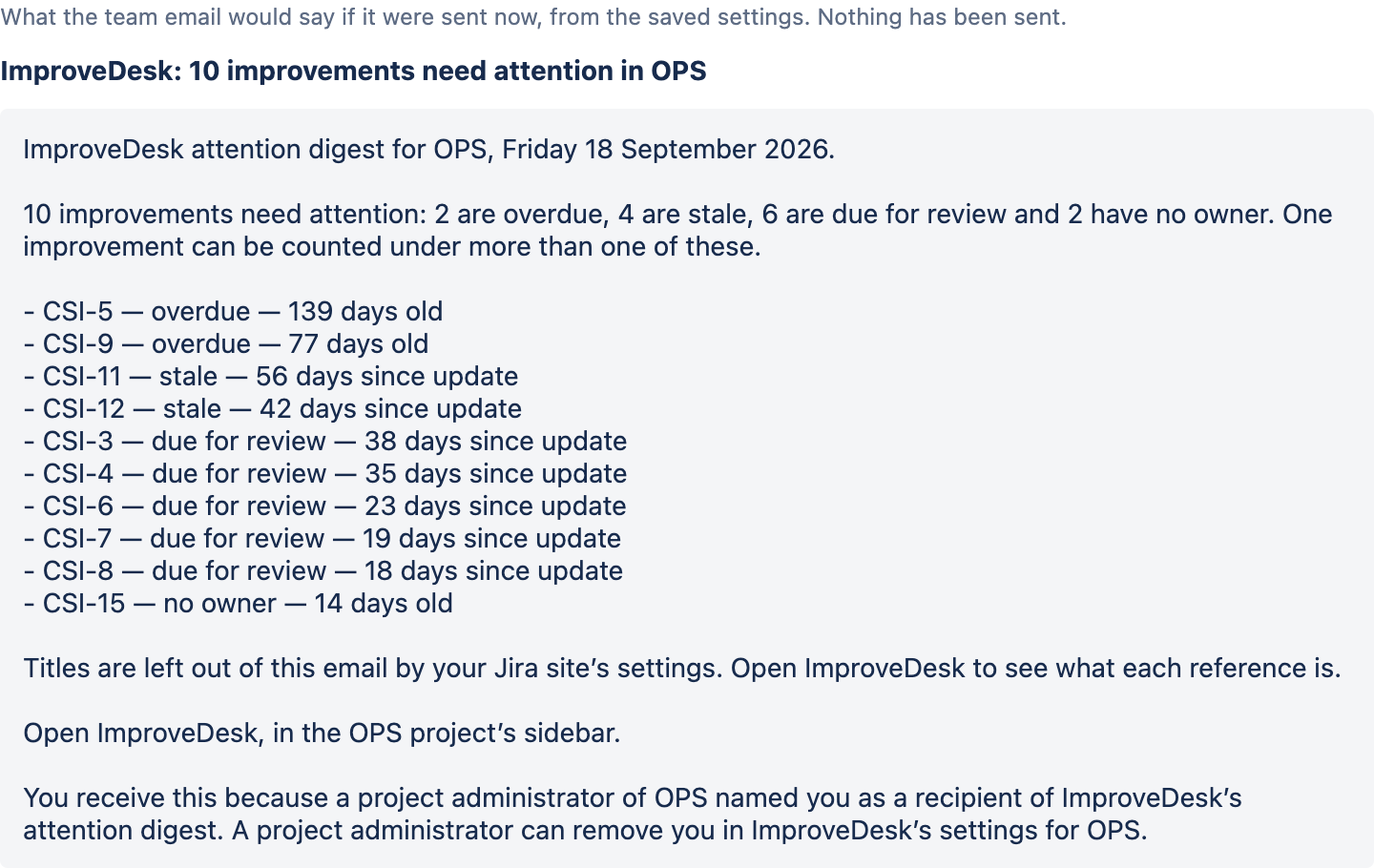
The daily sweep already knows what is overdue, stale, due for review or has no owner. The digest sends it to the people who need to act, weekly on a day you choose or daily, by Jira's own email.
The site decides first
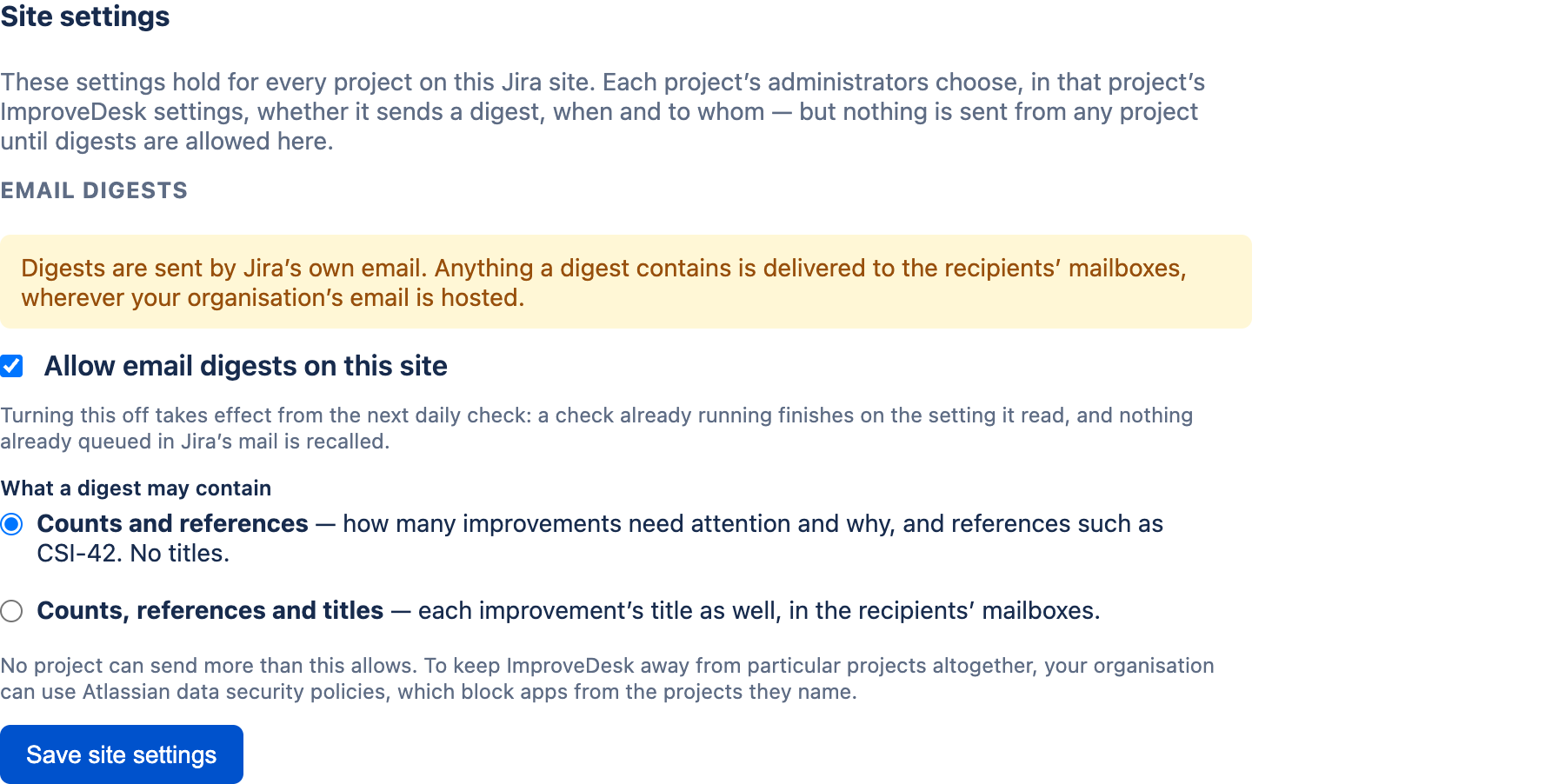
A Jira administrator allows digests for the whole site on ImproveDesk's Configure page, under Apps → Manage your apps. It is off until they do, and it sets what a digest may carry: counts and references, or titles as well.
Then each project
In a project's Settings, its administrators choose weekly or daily, the issue Jira sends the email from, up to ten team recipients, and whether each owner is also sent their own items.
- How many improvements need attention and why, then the ten that have waited longest, by reference
- Titles only where the site allows them, and never a benefit figure, a name or an account id
- One email per person: an owner who is also a team recipient gets their own items as a section of it
- A weekly digest is sent even when nothing needs attention, so its absence tells you the check has stopped
- Preview what the saved settings would send, before anything is sent
- Settings says what Jira answered last time — accepted for whom, or why not
Export
CSV that is safe to open in Excel
Export the current filtered view — 34 columns covering the whole record, with user account ids resolved to display names.
Formula characters are neutralised. A register exported from Jira is
opened in a spreadsheet the same afternoon. An unescaped
=HYPERLINK(...) sitting in a free-text field is a live
spreadsheet injection, so leading =,
+, - and
@ characters are prefixed before the file is written.
Configuration
Per project, by an administrator
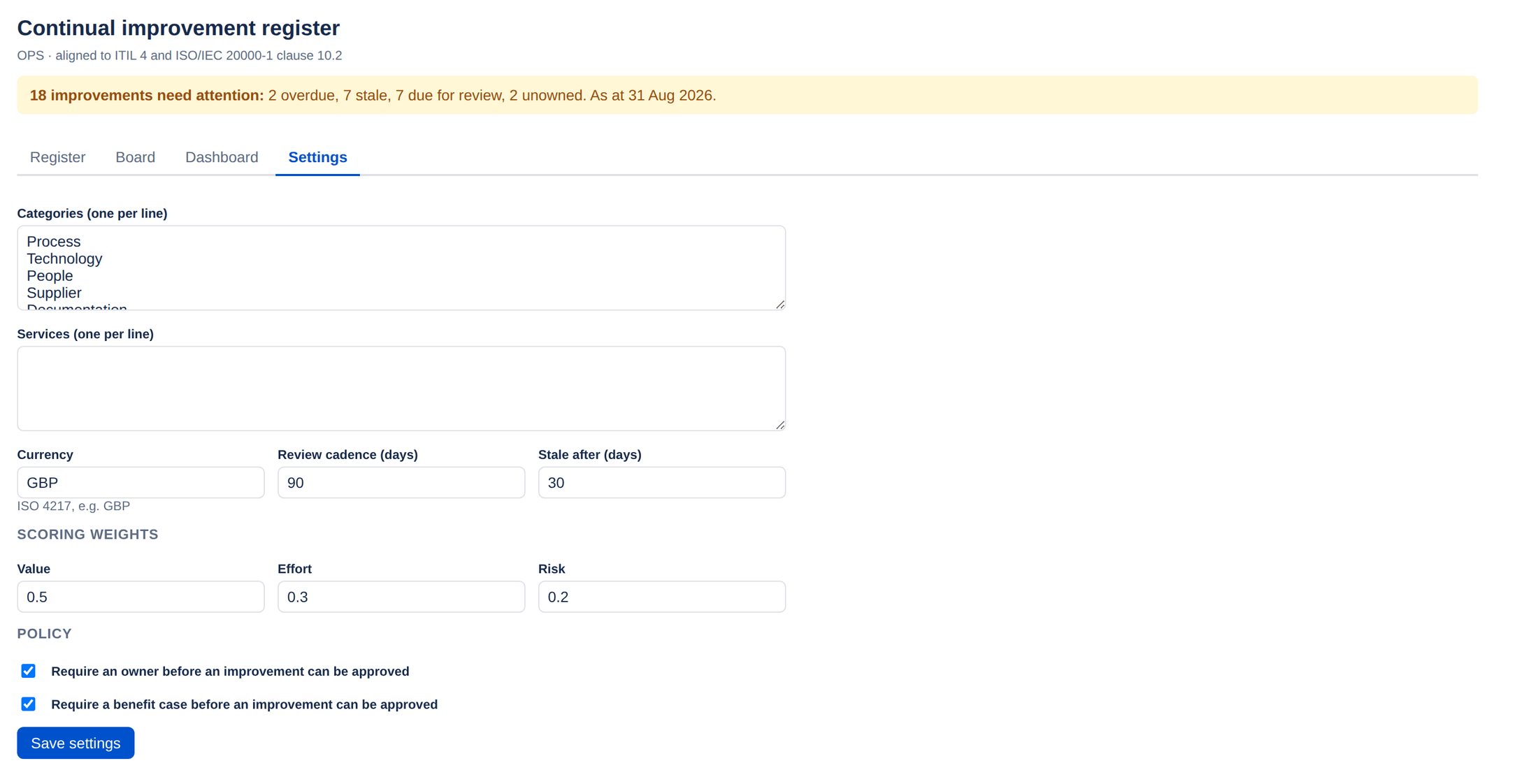
Categories, services, currency, review cadence, the stale threshold, the composite score weights and two approval policies — whether an owner and a benefit case are required before an improvement can be approved. The same page holds the switch for publishing to Jira issues, with its Remove published data button, the project's email digest, and the deletion log: every improvement deleted from the project, with who deleted it and when.
See how the lifecycle holds it together
The strict transition graph is what makes the benefit figures defensible. It is worth two minutes of your time.