
For Jira & Jira Service Management
Continual improvement that survives an audit.
ImproveDesk turns the improvement register you keep in a spreadsheet into a first-class Jira app — with a strict lifecycle, defensible benefit figures and an append-only audit trail. It runs entirely on Atlassian Forge, so your data stays in your Atlassian tenancy unless you switch on the optional email digest, which Jira sends to the people you choose.
- 9 lifecycle statuses, strictly enforced
- ITIL 4 continual improvement practice
- ISO/IEC 20000-1 clause 10.2
The problem
Your improvement register is a spreadsheet nobody trusts.
It has three owners, two versions and a benefits column last updated in March. When the auditor asks how you know an improvement worked, the honest answer is that somebody typed a number into a cell — and nothing stopped them typing a different one.
A register, not a spreadsheet
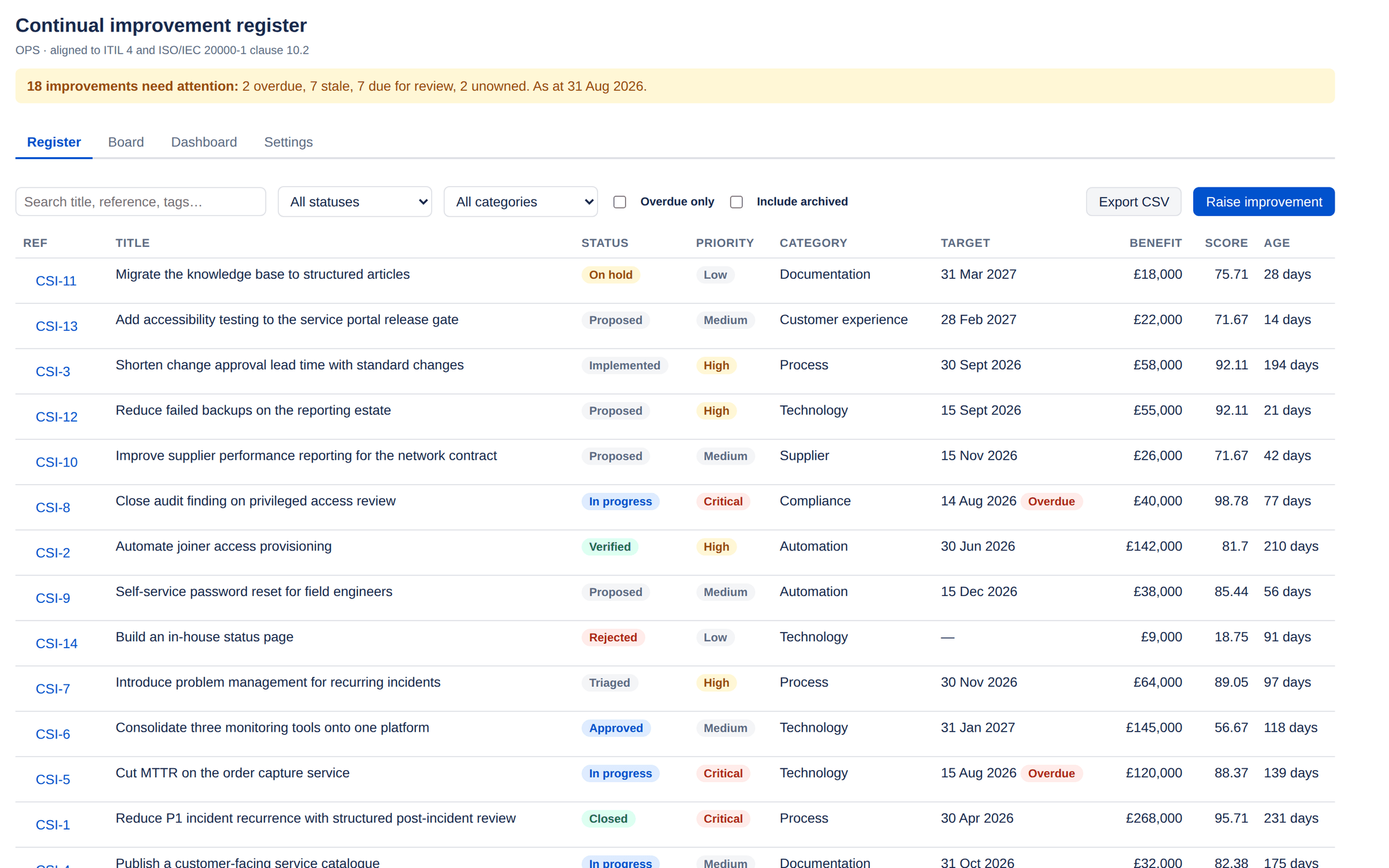
Every improvement carries a project-scoped reference, a source, an owner, a sponsor, a target date, a benefit case and a set of measures. It lives beside the work in Jira, not in a file someone forgets to update.
Benefits you can defend
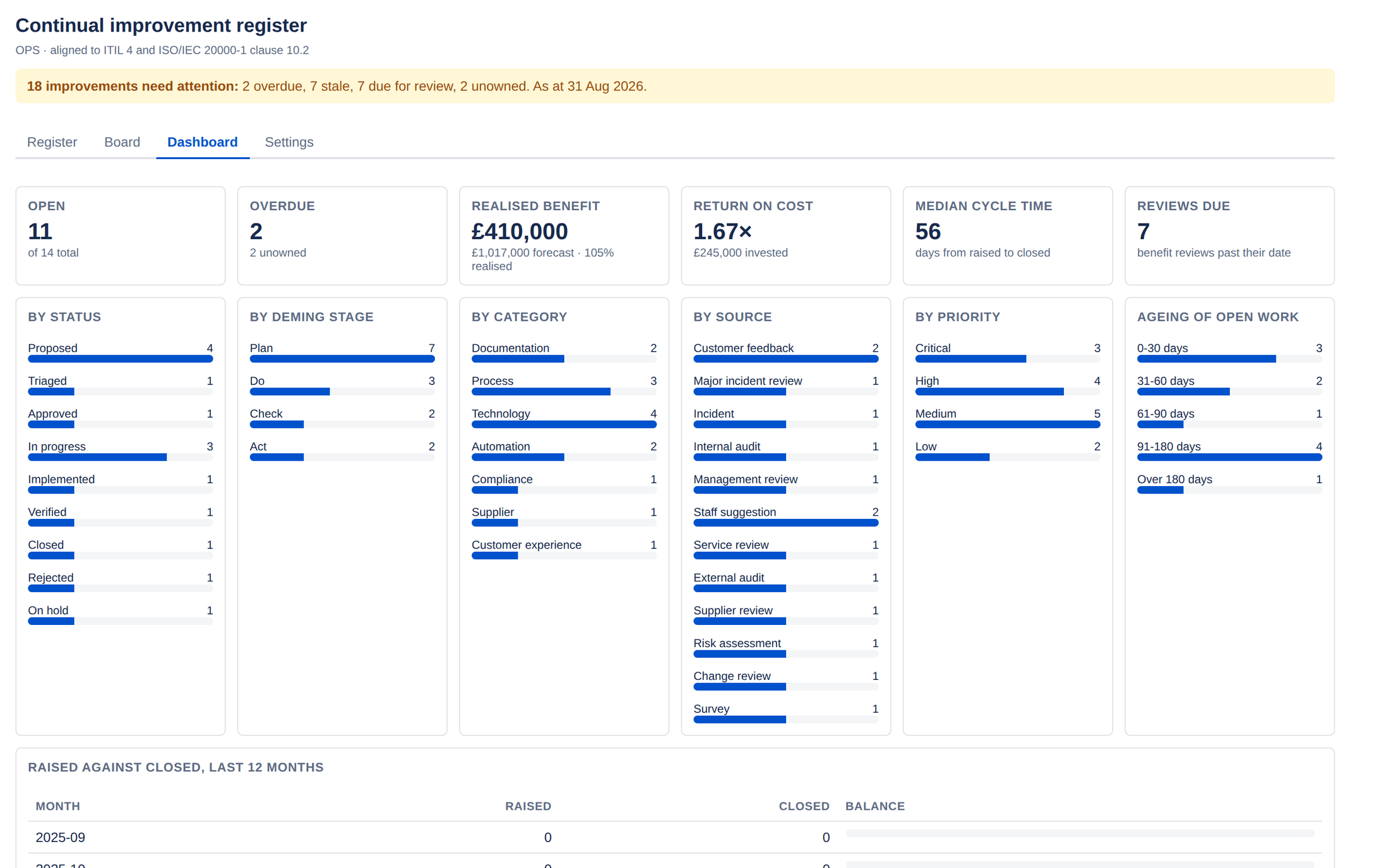
Realised benefit is counted only from verified and closed records. An improvement cannot reach verified without having been implemented, so the realisation figures on your dashboard are backed by the lifecycle itself.
Evidence an auditor accepts
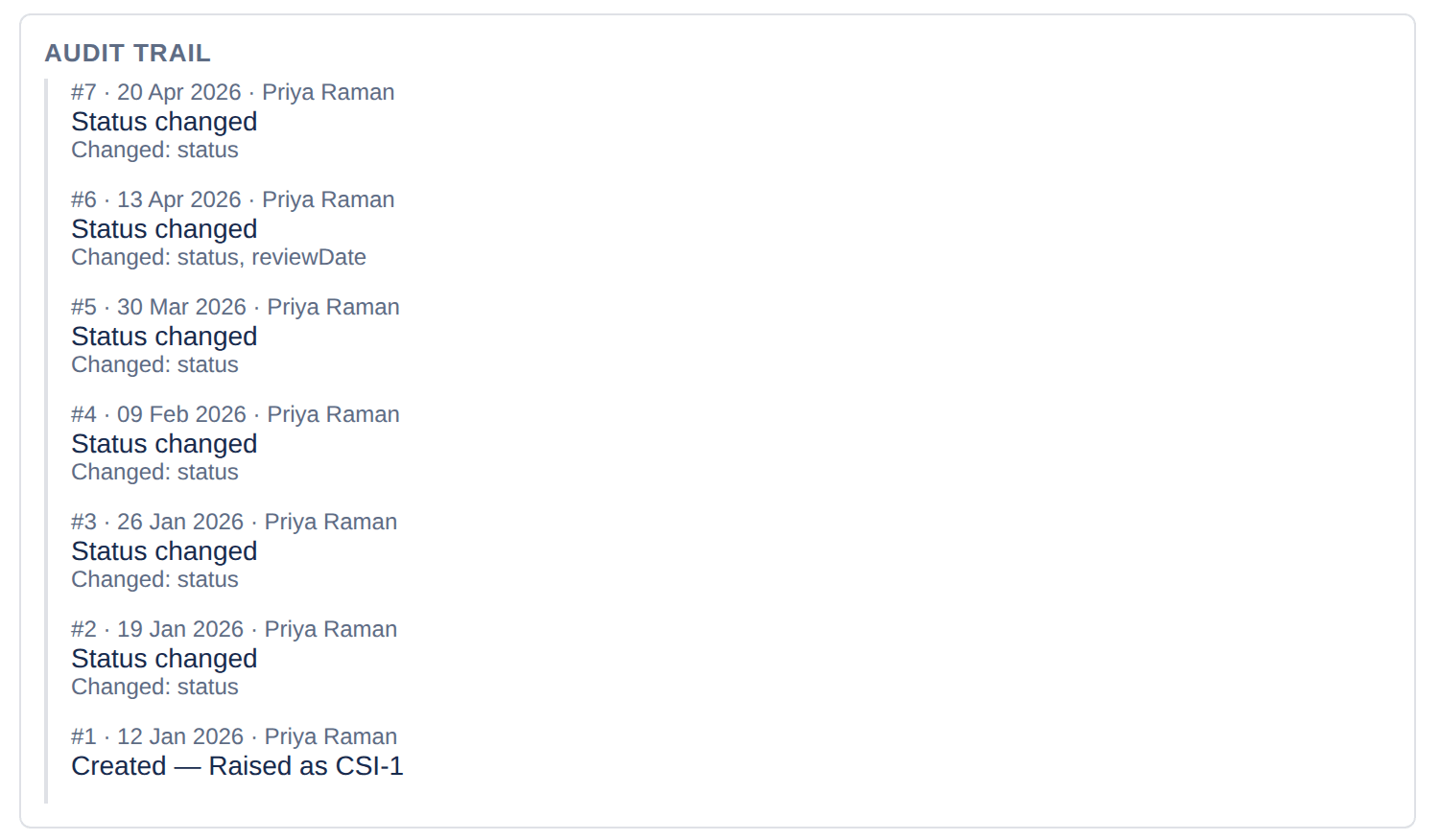
An append-only, field-level audit trail with a per-improvement monotonic sequence. Events written in the same millisecond still have a defined order, and a missing sequence number is detectable.
Nothing leaves your tenancy unless you choose it
ImproveDesk runs entirely on Atlassian Forge. There is no external service, no separate database and no infrastructure for you to run or for your security team to review. The optional email digest is the one exception, and only once a Jira administrator allows it: Jira’s own email sends it to the people a project chooses.
Benefits realisation
Numbers the finance director will actually accept.
Forecast, realised and cost figures per improvement, rolled up into realisation rate, return on cost and net benefit. Realised benefit is counted only from records that reached verified or closed — an optimistic forecast on open work cannot inflate it.
Prioritisation & flow
Score improvements, don't argue about them.
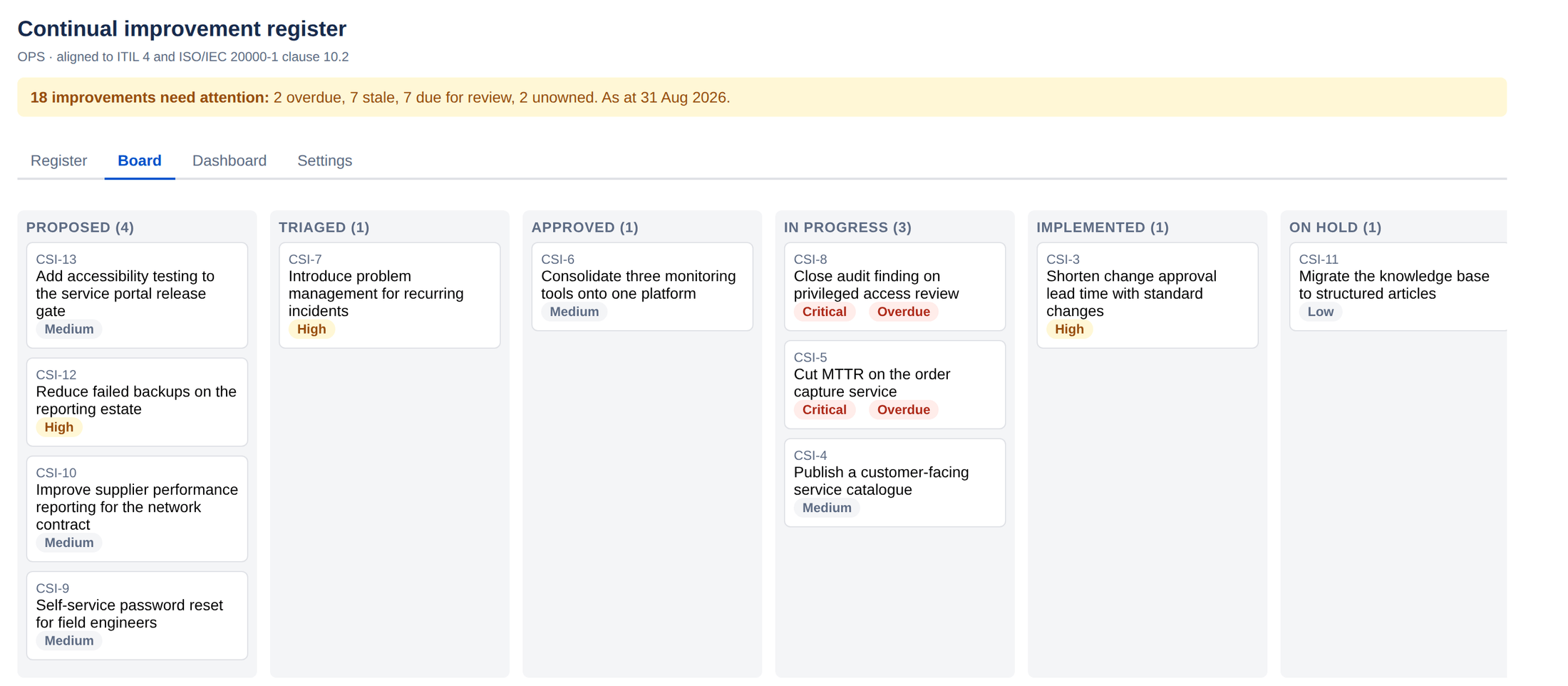
RICE scoring sits alongside a configurable composite score, combining the benefit case, the effort size and the record's priority with weights you set. An unscored improvement returns no score at all rather than zero, so it is never quietly ranked alongside genuinely low-value work.
- Reach, impact, confidence and t-shirt effort sizing
- Weights you set per project, in Settings
- Sort the register by score to build the review agenda
Audit trail
Append-only, field-level, with a sequence you can check.
Every mutation writes an event recording who changed what and when. There is no update path and no delete path — only a project administrator deleting an entire improvement removes its history, and the deletion itself is kept, with who and when, in the deletion log on the Settings page.
- A per-improvement monotonic sequence, so a gap is detectable
- Each change in words, old value to new — Status: Implemented → Verified
- Rejection reasons captured and kept
Jira integration
Improvements and delivery work, joined up.
Link the issues that deliver an improvement, or create one from the improvement in a single step. An issue panel shows which improvements a given issue contributes to, so the person doing the work can see why.
- Deleting an issue in Jira removes the dangling link automatically
- Resolving one is recorded as an audit event, not a silent transition
- Issues you link and view are read as you, so Jira permissions still apply
- Link an existing issue, or create one from the improvement — see the guide

Beyond the register
The register, where people already look.
Three ways to put the register in front of people who never open it: on the Jira issues it depends on, on a Jira dashboard, and in their inbox. Publishing and email are each off until an administrator turns them on, the gadget appears only where somebody adds it to a dashboard, and each carries only what it has to.
- Search and report on the register in Jira, with six search fields
- One project's figures on any Jira dashboard, checked for every viewer
- A weekly or daily email of what needs attention, sent by Jira
Published onto Jira issues
Switched on per project, ImproveDesk writes a small status record onto each linked
issue — how many improvements rely on it, their statuses and stages, the highest
priority, the earliest review date and whether any is overdue. No names, references,
titles or benefit figures. Then improvedeskOverdue = "true"
is a Jira search.
A Jira dashboard gadget
Needing attention, overdue, open and benefit realised for one project, with the five improvements that have waited longest. Somebody who cannot browse the project sees a sentence saying so, not the figures.
An email attention digest
What is overdue, stale, due for review or has no owner, by reference, to up to ten people a project chooses — and, if you like, each owner their own. A Jira administrator allows it for the site first, and decides whether titles may be included.
Who it is for
One register, four audiences.
Service managers
Run the monthly service review from the register instead of rebuilding a deck. Filter by status, category or overdue state, search it, and export the exact view you are discussing.
Quality and compliance leads
Show clause 10.2 evidence directly from the tool, with dates, owners and a trail that has no edit or delete path.
Heads of IT
See realisation rate, return on cost and net benefit across the portfolio, and which improvements have stalled — and put a project’s headline figures on a Jira dashboard.
Delivery teams
See which improvements a Jira issue contributes to, right on the issue, so the person doing the work knows why it matters.
Built on Atlassian Forge
No external service. No declared egress. No infrastructure.
ImproveDesk is a Forge app. Its code runs on Atlassian's own compute and its data lives in Atlassian's storage, inside your tenancy. There is no vendor database to review, no data-processing agreement to negotiate for a third-party host, and nothing for you to patch. The app makes no outbound call: where email digests are allowed, Jira's own email sends them.
Get started
Put your improvement register where the work is.
ImproveDesk installs from the Atlassian Marketplace into your Jira site. Improvements are scoped per project, so you can start with one team and expand when it earns its place.
Already installed? Open ImproveDesk from any Jira project's sidebar to raise your first improvement.