
Everyday use · 4 min read
Delivery issues and the issue panel
Linking an existing issue or creating a delivery issue, how linked issues appear on a record and on the issue itself, and which issues can be linked.
What a delivery issue is
An improvement says what should change. The Jira issues that actually make the change are its delivery issues. Holding the link means the register can answer "is this moving?" from the delivery work rather than from somebody's recollection.
Two ways in. On an improvement, Link issue attaches an issue that already exists, and Create delivery issue makes a new one from the improvement and links it in the same step. Both act as you, so Jira sees your name on the work and applies your permissions.
On the improvement
Where a record has linked issues, they appear in a Delivery issues panel with each issue's key, summary and current Jira status, read live from Jira.
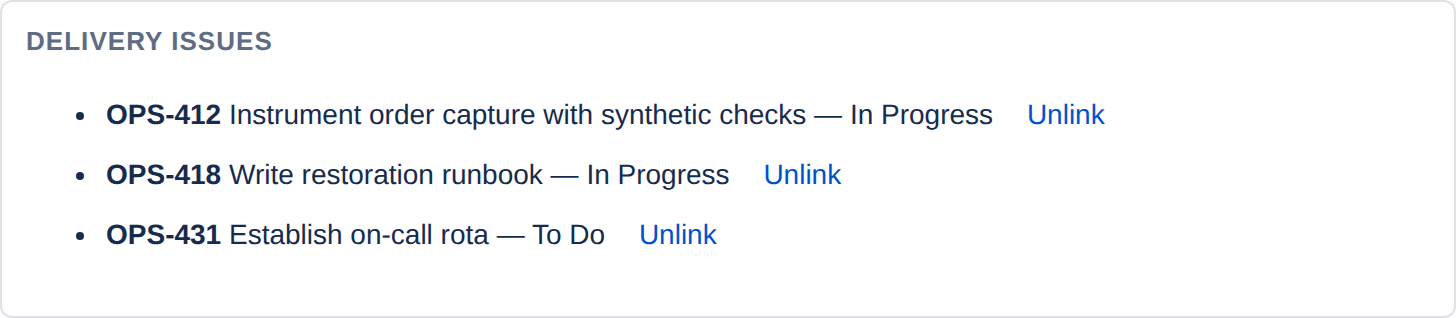
The issues are read as you, not as the app. If a linked issue sits in a project you cannot see, it will not appear — Jira's own permissions still apply, and the register cannot be used to peek at work you are not entitled to.
Unlink removes the association. It does not touch the Jira issue itself, and the removal is written to the audit trail.
If a record lists issue keys but the panel says the issues could not be read from Jira, that is usually a permission difference rather than a fault — somebody with wider access linked work you cannot see.
On the Jira issue
The other half is a panel on the issue itself, headed Continual Improvement. It answers the question the person doing the work actually has: why am I being asked for this?

Each entry gives the reference, the title, the category, the target date and the current status. Where the improvement is overdue, that is shown too.
If an issue contributes to nothing, the panel says so plainly rather than rendering an empty box.
What happens automatically
Two Jira events are handled without anybody doing anything, which is what stops the links quietly rotting.
| When this happens in Jira | ImproveDesk does this |
|---|---|
| A linked issue is deleted | Removes the link from every improvement that held it, and records the removal in each audit trail. Without this you would accumulate references to issues that no longer exist. |
| A linked issue is resolved | Writes an audit event on each improvement noting that the issue was resolved — once, when it is resolved; later edits to a resolved issue add nothing. It does not transition the improvement. |
Why resolving an issue does not advance the improvement. Finishing the delivery work is not the same as the improvement having worked. Moving a record to Implemented — and later claiming a benefit for it — is a judgement that belongs to its owner, so the app records the fact and leaves the decision alone.
Linking an issue
Open the improvement and find the Delivery issues panel. Archived records are read-only, so the buttons are not offered on them.
- Link issue asks for an issue key — the hint reads An issue in OPS that you can see, such as OPS-1. Type it and select Link.
- Create delivery issue asks for an issue type — Task, where the project offers one — and creates [CSI-12] the improvement's title in the project, as you. Select Create and link; the panel confirms Created OPS-452 in Jira and linked it to this improvement.
Both are written to the audit trail. Where links exist, the register's search matches linked
issue keys too, so pasting OPS-412 into it finds the improvements that
issue belongs to.
Which issues can be linked
Only an issue in the same project that you can see. Anything else is refused with OPS-999 is not an issue in OPS that you can see — one message whether the issue does not exist, sits in another project or is hidden from you, so the register cannot be used to find out whether an issue you cannot see exists. A key that is not the shape of a Jira key at all gets ABC is not a Jira issue key, such as OPS-1.