
Reporting · 4 min read
The dashboard gadget
Putting one project's register on a Jira dashboard, choosing its project, reading its four figures, and what viewers without access see.
What it is for
The gadget puts one project's register on a Jira dashboard: four figures and the five improvements that have been waiting longest. It is for the people who look at a dashboard every morning and would not otherwise open the register — a service owner, a team lead, a wallboard in the office.
It shows the same figures as the register's own dashboard, from the same calculation, so the two never disagree about what is overdue.
Adding it to a dashboard
- Open a dashboard you can edit Adding and configuring gadgets is Jira's own dashboard editing. Anyone Jira lets edit the dashboard can do it; ImproveDesk adds no permission of its own.
- Add the gadget called "ImproveDesk" Its description reads What needs attention in one project's improvement register. Until a project is chosen, Jira shows its own placeholder, This gadget hasn't been configured yet.
- Choose the project In the gadget's edit view, pick the project from the list and select Save.
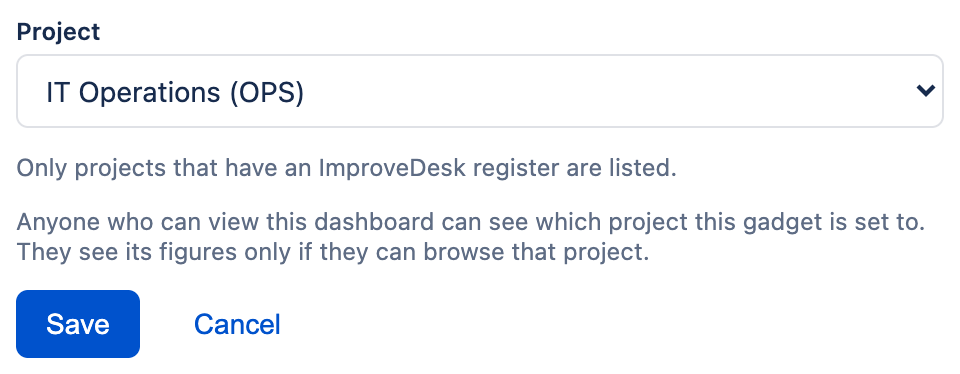
Which projects are offered
Only projects that hold an ImproveDesk register and that you, the person editing, can browse. The list is checked against your Jira permissions each time the edit view opens. If none qualifies, the edit view says No project you can browse has an ImproveDesk register yet.
If the gadget is already set to a project you cannot choose — one you cannot browse, or one that has been archived, deleted or given a new key — the edit view says This gadget's project is not one you can choose here. Choosing another will replace it. It does not print the project it was set to, since you may not be entitled to know it.
Choosing a project is visible to everyone who can view the dashboard. The edit view says so beneath the list. The figures are shown only to people who can browse that project, and everyone else sees a message instead — but which project it is set to is not hidden from anyone who can view the dashboard. Put it on a dashboard whose audience you are comfortable knowing that.
Cancel leaves without changing anything. If saving fails, the edit view says The gadget's settings could not be saved. Try again. The project choice is stored by Jira as part of the dashboard, not by ImproveDesk, so it writes nothing to the register and nothing to its audit trail.
Reading the gadget
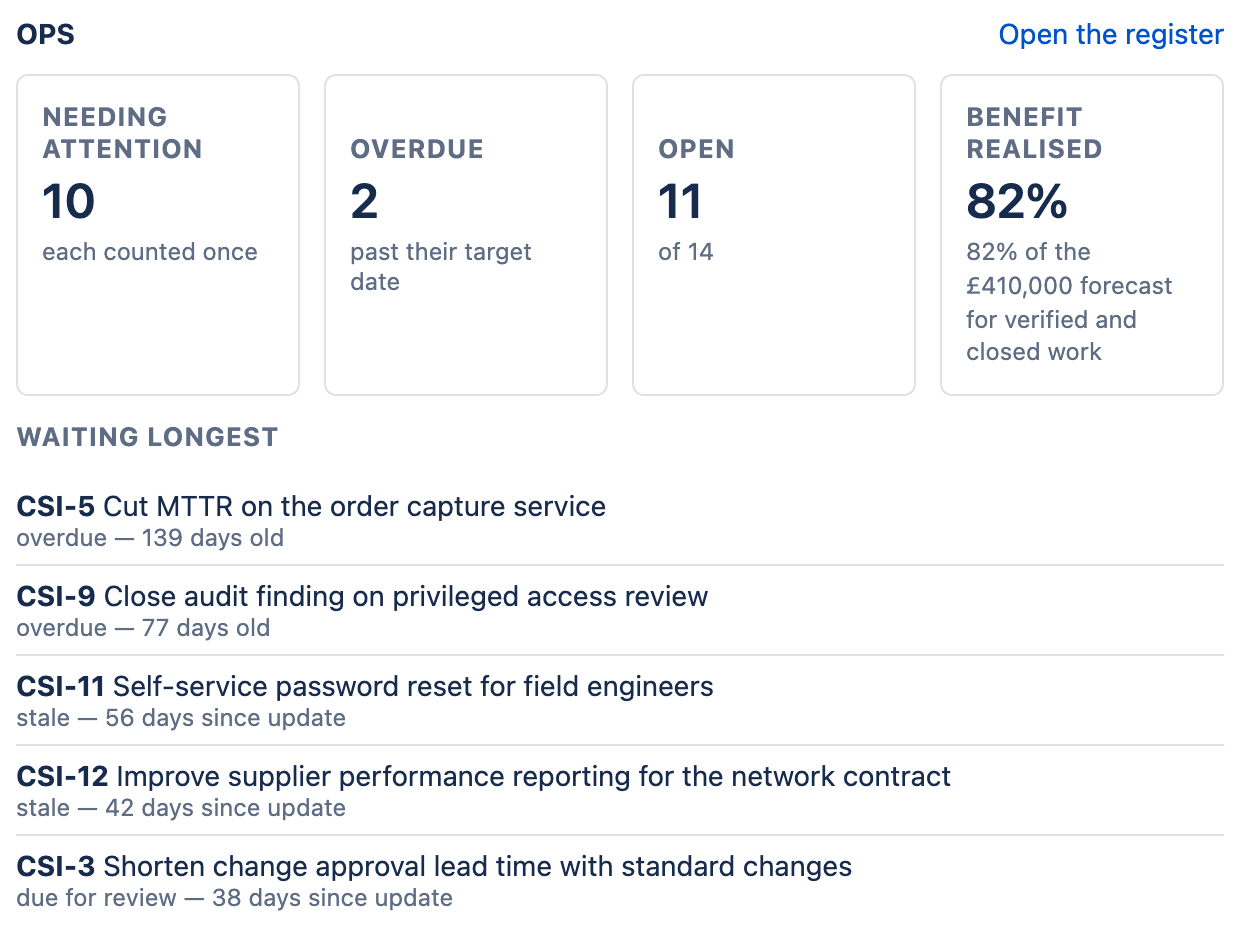
The heading is the project key, and Open the register beside it takes you to that project's ImproveDesk page.
| Figure | What it counts |
|---|---|
| Needing attention each counted once | Improvements that are overdue, stale, due for review or with no owner — for any of those reasons, and each improvement once however many apply. |
| Overdue past their target date | Open improvements past their target date. The target day itself still counts as on time. |
| Open of N | Open improvements, out of every improvement in the register. Archived ones are left out of both numbers. |
| Benefit realised | The realisation rate, with a sentence beneath worded exactly as on the register's dashboard — for example 82% of the £410,000 forecast for verified and closed work. Until something is verified the figure is a dash and the sentence reads £410,000 forecast, none yet verified. A rate above 100% is shown as it is. |
How the realisation rate is worked out is in Reading the dashboard.
Waiting longest
Beneath the figures, the five improvements that have been waiting longest — the top five of the dashboard's Needs attention list. Each shows its reference and title, then the reason and a number of days with its unit:
- overdue — 139 days old and no owner — 14 days old count from when the improvement was raised.
- stale — 56 days since update and due for review — 38 days since update count from its last update.
The list is sorted by that number, whichever it means, which is why the unit is always printed. For an overdue item it is the record's age, not how far past its target date it is. When nothing needs attention, the list is replaced by Nothing needs attention.
The gadget and the attention banner can differ for a few hours. The gadget's figures are worked out each time it loads. The banner above the register is written by the daily sweep and carries the date it was worked out. An improvement whose target date passes today appears in the gadget's Overdue figure straight away, and in the banner after the next sweep.
Keeping it up to date
The gadget does not refresh itself. Its figures are worked out when it loads, so a dashboard left open all day shows the morning's figures all day. To see the latest, refresh the dashboard.
What other people may see instead
Everyone who can view the dashboard sees the gadget, so it checks each viewer, every time it loads, against the project it is set to. Anyone who is not shown the figures sees one of these instead — and none of them names the project.
| Message | Why |
|---|---|
| You do not have access to the project this gadget shows. If you need it, ask a Jira administrator for Browse access to that project. | The viewer cannot browse the project the gadget is set to. |
| Sign in to Jira to see this gadget. | The viewer is not signed in. |
| This gadget has not been set up. Anyone who can edit this dashboard can choose a project in the gadget's settings. | No project has been chosen yet. |
| No improvements are recorded in OPS, or all of them are archived. | The viewer can browse the project, but there is nothing live in its register. This is the one message that names the project, because the viewer is entitled to see it. |
| ImproveDesk could not load these figures. Try refreshing the dashboard. If it keeps happening, the project's ImproveDesk page shows the same figures. | Something went wrong reading the register. |
Next: to have the same attention list arrive by email instead, see Emailing the attention digest.