
Reporting · 6 min read
Emailing the attention digest
The site and project switches, who receives what and when, what the email says, and what each delivery message means.
What it is
The attention digest is the register's Needs attention list, sent by email — weekly or daily — to the people who should act on it. A team gets the whole project's list; each owner can also get just their own items. It is for the people who will not open the register until something tells them to.
The email is sent by Jira's own email, from its own mail queue, using an issue in the project as the thing it is sent from. ImproveDesk decides who gets what and what it says; Jira does the sending.
Two switches, and both must be on
- A Jira administrator allows digests for the site Once, for every project. Until this is on, no project sends anything, whatever its own settings say.
- A project administrator turns the digest on for the project In the project's ImproveDesk settings: how often, from which issue and to whom.
Both are off out of the box, so nobody starts receiving email because the app was installed or upgraded.
The site settings
Open Apps → Manage your apps, find ImproveDesk and choose Configure. The page is for Jira administrators only; ImproveDesk asks Jira on every read and every save whether you are one, and anyone else is told You need Jira administrator permission to change ImproveDesk's site settings.
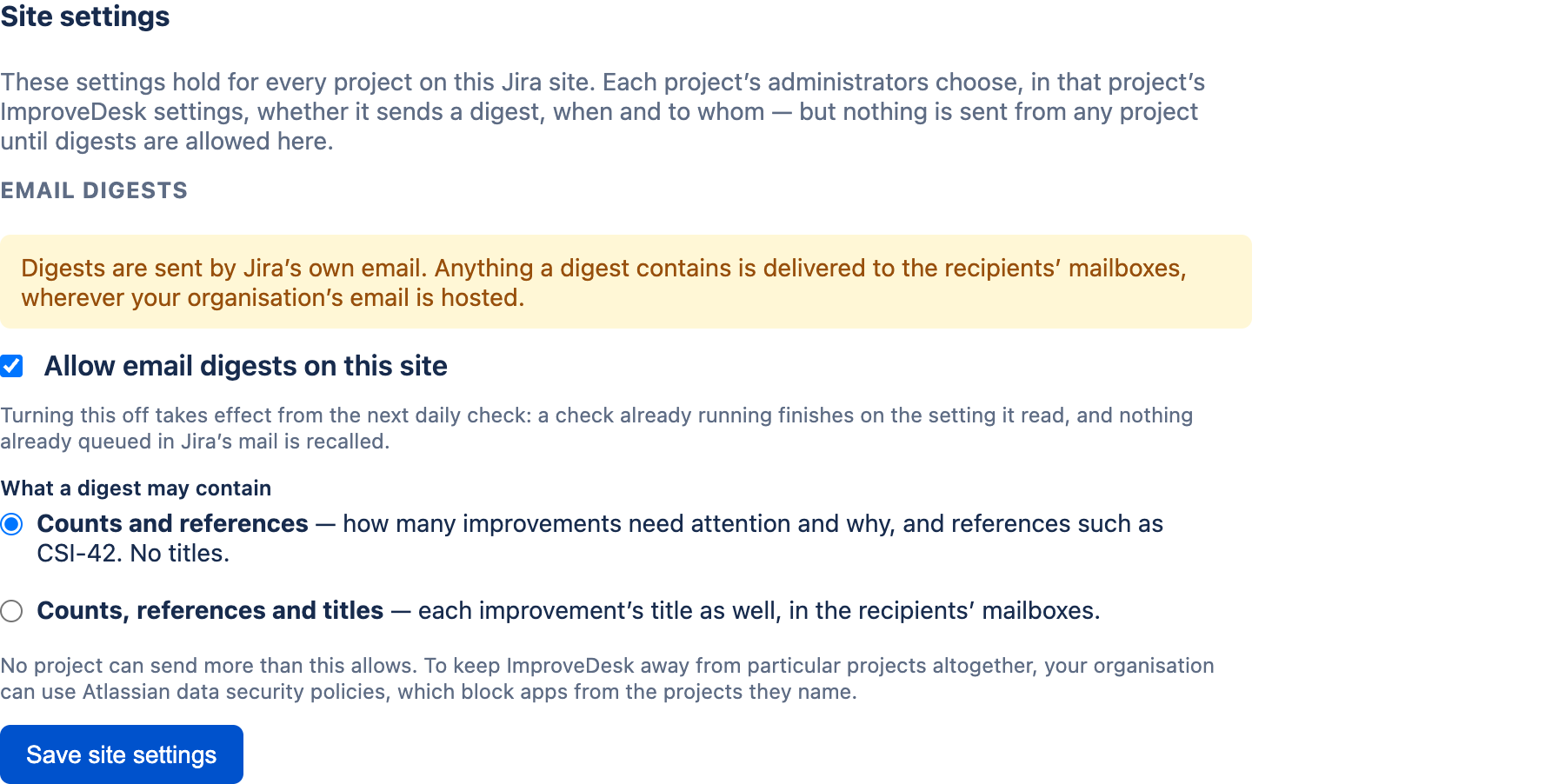
| Setting | What it does |
|---|---|
| Allow email digests on this site | Off by default. While it is off, every project with a digest switched on records Not sent each day rather than sending, and its settings page says a Jira administrator has not allowed digests. Project administrators can still save their settings; they take effect once the site allows digests. |
| What a digest may contain | Counts and references — the default: how many improvements need
attention and why, and references such as CSI-42, but no
titles. Counts, references and titles adds each improvement's title.
This is a ceiling: no project can send more than it allows.
|
Select Save site settings; the page confirms Site settings saved. Turning digests off takes effect from the next daily check — a check already running finishes on the setting it read, and nothing already queued in Jira's mail is recalled. Switching off and on again within the same week or day does not email anybody twice.
The page also notes that your organisation can keep ImproveDesk away from particular projects altogether with Atlassian data security policies, which block apps from the projects they name.
The project settings
In the project's Settings tab, below publishing, is Email the attention digest. It needs the Jira administer projects permission, like the rest of the page, and it is saved with the rest of the page by Save settings.
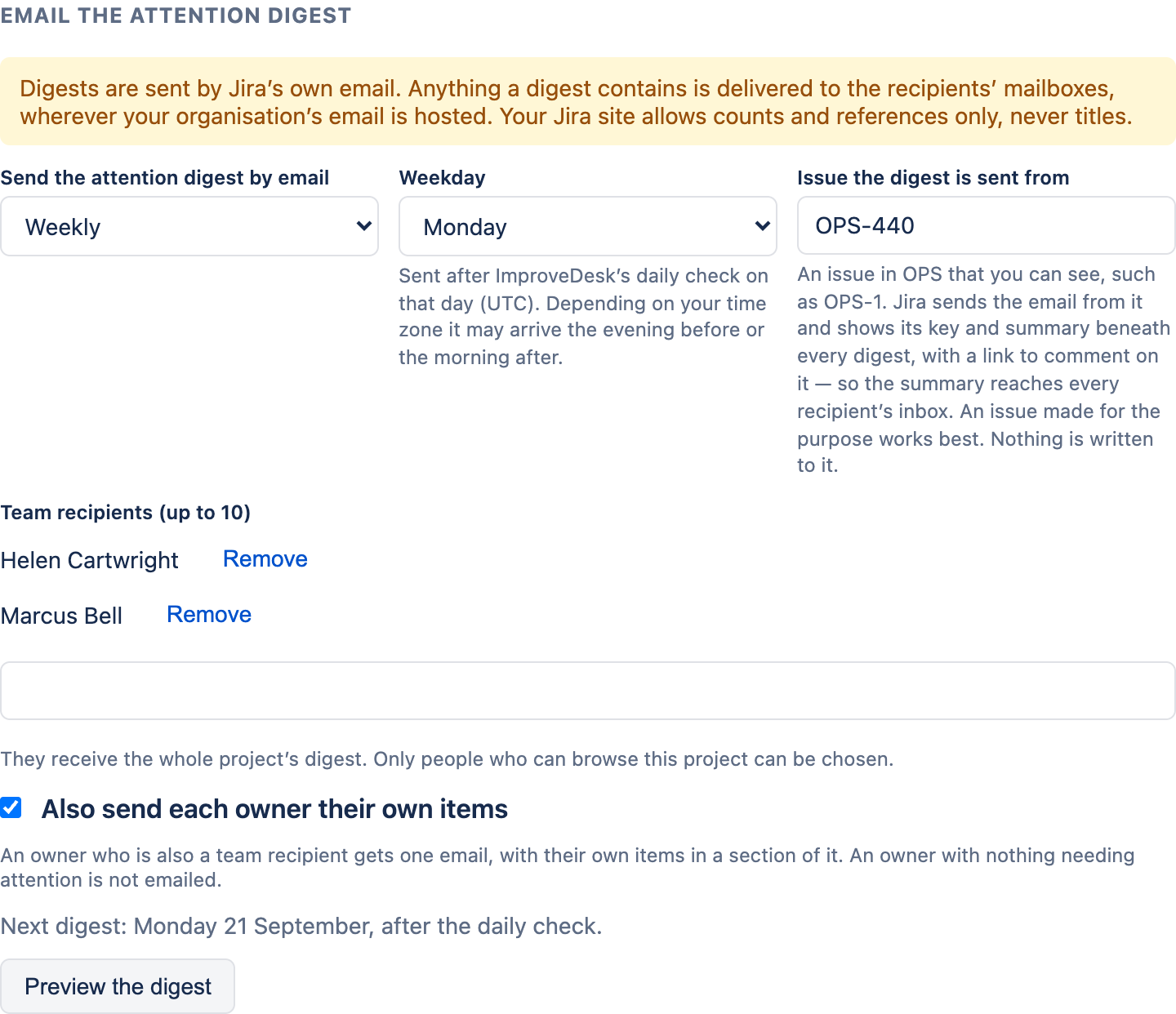
| Control | What it does |
|---|---|
| Send the attention digest by email | Off, Weekly or Daily. Off by default. |
| Weekday | Weekly only. The digest goes after ImproveDesk's daily check on that day, and the day is a UTC day — depending on your time zone it may arrive the evening before or the morning after. |
| Issue the digest is sent from |
An issue in this project that you can see, such as OPS-1. Jira
sends the email from it, and shows its key and summary beneath every digest — see
what Jira adds. An issue made for the purpose, summarised as
something like ImproveDesk digest, works best. Nothing is written to it.
Required whenever the digest is switched on.
|
| Team recipients (up to 10) | They receive the whole project's digest. Type a name and pick from the list, which offers only people who can browse this project. Remove takes someone off. |
| Also send each owner their own items | Each owner gets an email listing only the improvements they own that need attention. An owner who is also a team recipient gets one email, with their own items in a section of it. An owner with nothing needing attention is not emailed. |
If the save is refused over the issue, the message says why:
- Choose an issue in OPS for the digest to be sent from — the digest is on and the field is empty.
- Jira could not find that issue, or you cannot see it. Check the key.
- That issue is in another project. Choose an issue in OPS.
Previewing it
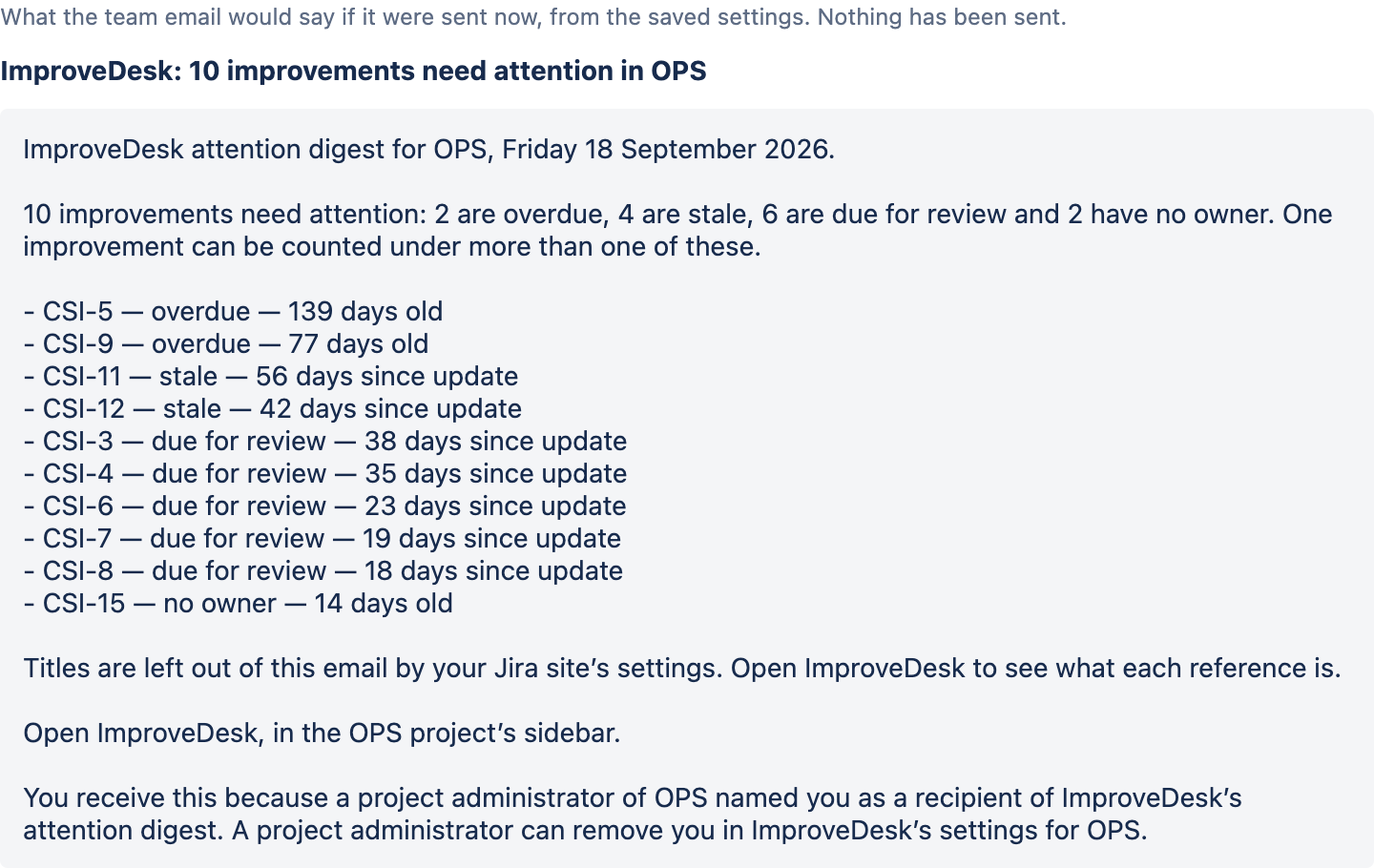
Preview the digest shows the team email as it would be if it were sent now, from the saved settings, under the site's content setting. Nothing is sent. While anything on the settings page is unsaved, the button is disabled and says Save your changes to preview them. — so a preview never describes settings that are not the ones in force.
What the email says
A team digest, from top to bottom:
- The subject — ImproveDesk: 10 improvements need attention in OPS. An owner's own email reads ImproveDesk: 3 of your improvements need attention in OPS.
- The project and the date.
- The counts — how many need attention, and how many are overdue, stale, due for review or have no owner. One improvement can be counted under more than one of these, and the email says so.
- Up to ten items, longest waiting first: each as CSI-5 — overdue — 139 days old, with the title after the reference when the site allows titles. Beyond ten, the list ends and 4 more.
- A Yours section, when the recipient also owns items and owners' digests are on.
- A note that titles are left out, when the site allows counts and references only.
- Where to open the register — a link to the project on your Jira site, and the reminder that ImproveDesk is in its sidebar. The preview leaves the link out and names the place instead.
- Why you receive it — named as a recipient by a project administrator, or an owner whose project has owners' digests switched on — and that a project administrator can change it in ImproveDesk's settings.
The units follow the dashboard: days old for overdue and no-owner items, counted from when the improvement was raised; days since update for stale and due-for-review items. ImproveDesk's part of the email carries no benefit figures and no names.
What Jira adds beneath it
Jira adds its own card beneath every digest, as it does for any notification about an issue: the project name, the key and the summary of the issue the digest is sent from, and an Add Comment link. So that summary reaches every recipient's inbox, and a recipient who uses Add Comment comments on that issue — not on the digest. Choose an issue whose summary you are happy for every recipient to read; one made for the purpose is simplest.
When nothing needs attention
- A weekly team digest is sent anyway, headed nothing needs attention in OPS this week — so that its absence would tell you the weekly check has stopped.
- A daily team digest is not sent.
- An owner's own email is never sent empty.
When it goes, and what you can see afterwards
Digests go out after ImproveDesk's daily check — every day for a daily digest, on the chosen weekday for a weekly one. Nobody receives more than one email per project in a day (daily) or a week (weekly), even if the check runs again or has to pick up where it left off. Beneath the controls, the section shows two lines:
- Next digest — for example Next digest: Monday 21 September, after the daily check.
- Last delivery — what happened the last time, in words.
"Accepted" is all ImproveDesk can know. When all is well the line reads Jira accepted the digest for 3 people on Monday 21 September. Jira sends it from there; ImproveDesk cannot see whether it was delivered or read. That is exactly true: ImproveDesk hands each email to Jira, and Jira's answer is the last thing it hears. A bounced message, a spam filter or an unread inbox is invisible to it.
The other things the last-delivery line can say:
| It says | What happened, and what to do |
|---|---|
| Nothing needed attention on …, so no digest was sent. | Nothing to do. |
| Jira accepted the digest for 2 people … but would not email … | Jira would not email some people — most likely they can no longer see the project, or their account is deactivated. They are named where Jira can name them, and are not retried until the next digest. |
| Not sent: a Jira administrator has not allowed email digests on this Jira site. | The site switch is off. Ask a Jira administrator to turn it on under Configure. |
| Not sent on …: outgoing email is switched off on this Jira site. | A Jira administrator can turn it on in System settings, under Outgoing mail. |
| Not sent: Jira refused. | Either outgoing email is off on the Jira site, or ImproveDesk is not allowed to use the issue it sends from. A Jira administrator can check both. |
| Not sent: Jira did not let ImproveDesk use OPS-440. | A data security policy or the project's permissions may be blocking apps. A Jira administrator can check. |
| Not sent: the issue this digest is sent from no longer exists. | Choose another issue and save. |
| Not sent: OPS-440 has moved to another project. | ImproveDesk will not send one project's digest from another project's issue. Choose an issue in this project. |
| Not sent: nobody is set to receive it. | No team recipients and owners' digests off. Add a recipient. |
| Not sent: Jira would not email any of the people chosen. | Most likely they can no longer see the project, or their account is deactivated. Check the people chosen. |
| Not sent: Jira rejected ImproveDesk's request itself. | A fault in ImproveDesk, not in your settings. Nobody is marked as refused, and it tries again at the next daily check. If it keeps happening, contact ImproveDesk support. |
| Not sent: Jira did not answer. | It tries again on the next daily check. |
| Not sent yet: today's run reached its limit before this project. | A busy site with many digests. This project goes first on the next run. |
Turning it off
Set Send the attention digest by email to Off and save, and nothing more is sent from this project. To stop every project at once, a Jira administrator unticks Allow email digests on this site. Either way, an email Jira has already accepted is not recalled.
Related: the same attention list on a Jira dashboard is covered in The dashboard gadget; every other project setting is in Project settings.