
Administration · 10 min read
Project settings
Categories, services, currency, review cadence, the stale threshold, score weights, the two approval policies, publishing status to Jira issues, and the email digest.
Who can change these
Settings require the Jira administer projects permission for the project. Anyone else who opens the Settings tab sees Project administrator permission is required — ask a project administrator to change ImproveDesk settings for this project — rather than the form. The same check is made again on the server when anything is saved.
Every setting is per project. Two registers on the same Jira site can use different categories, currencies and approval policy, and changing one does not touch the other.
Categories
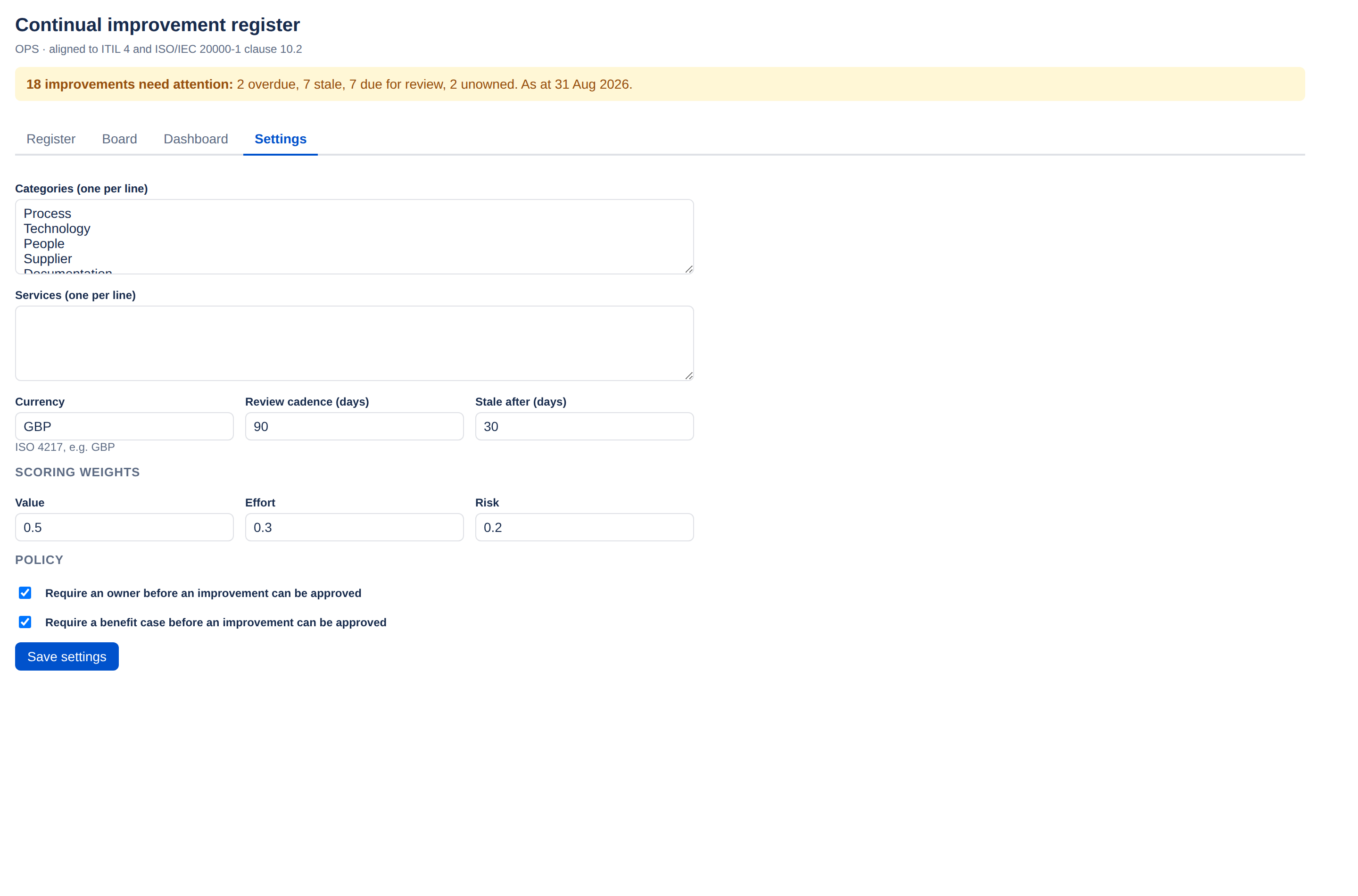
One per line. These populate the category dropdown on the form and the by category breakdown on the dashboard. The defaults are Process, Technology, People, Supplier, Documentation, Automation, Compliance and Customer experience.
Renaming or removing a category does not migrate existing records. An improvement already filed under a category you delete keeps that value, and will appear in the dashboard breakdown under a category no longer offered on the form. Reassign affected records before you remove a category, or leave it in place.
Fewer categories is usually better. Eight that everyone understands beats twenty that get picked at random, because the breakdown is only useful if the classification is consistent.
Services
One per line, naming the services this project improves. They are suggested in the Service box on the form, where people can still type a service that is not on the list. Leave it empty if your team does not think in terms of a service catalogue — nothing else depends on it.
Currency
An ISO 4217 code — GBP, EUR,
USD. Used to format every money figure on records, the dashboard and
the export.
It is a display setting only. Changing it does not convert existing figures: a forecast entered as 50,000 stays 50,000 and simply renders with a different symbol. Agree the currency before people start entering benefit cases.
Review cadence (days)
The default number of days between benefit reviews, applied to new improvements. 90 days out of the box.
It is a default, not a rule. Anyone can override it on an individual record, and clearing the field there means no periodic review at all rather than a fallback to this value.
Stale after (days)
How long an open improvement can go without being updated before it is flagged stale in the attention banner, on the dashboard, in the gadget and in the email digest. 30 days by default.
Tune it to how often you actually meet. A team reviewing monthly will find 30 days produces a useful nudge; one reviewing quarterly will find everything permanently stale and quickly learn to ignore the banner — which defeats the point.
Scoring weights
Three numbers driving the composite score. The defaults are value 0.5, effort 0.3, risk 0.2.
| Weight | What it rewards |
|---|---|
| Value | Forecast benefit against cost estimate. Raise it if your register should chase the biggest returns. |
| Effort | Smaller t-shirt sizes score higher. Raise it if you want quick wins to rise. |
| Risk | Driven by the record's priority field — Critical scores full marks, Low scores none. Raise it if urgency should outweigh return. |
Each weight is a number from 0 to 1, and at least one must be above zero — a save with all three at zero is refused, because every score would be zero and the backlog would stop ranking. The weights are divided by their total, so they need not sum to 1. Full arithmetic in Prioritising.
Changing the weights re-scores the whole register immediately, since the composite score is computed on read rather than stored. Expect the order of your backlog to move.
Policy
Two checkboxes, both on by default, and both enforced from Approved onwards — so they also gate the moves to In progress, Implemented, Verified and Closed. A field cannot be supplied to clear the gate and then removed.
Require an owner before an improvement can be approved
Stops work being approved with nobody accountable for it. Leave it on unless you have a deliberate reason — open improvements with no owner are the most common thing to go quietly stale.
Require a benefit case before an improvement can be approved
Requires either a forecast figure or a written narrative. Turn it off if your team records improvements that are genuinely about compliance or risk and where a monetary figure would be invented rather than estimated — though the narrative field exists precisely for that case, so consider leaving it on and writing the case in words.
Turning a policy on does not retrospectively block existing records. It is checked when a transition is attempted, so improvements already past Approved stay where they are. They will hit the gate on their next move.
Publish to Jira issues
Off by default, per project: a checkbox labelled Publish improvement status onto linked Jira issues, with an amber warning above it saying what it writes. Ticking it and saving writes a small status record onto every Jira issue this project’s improvements currently link, as a Jira issue entity property — Jira’s own storage on the issue, not ImproveDesk’s. That lets anyone with a Jira licence search and report on the register from Jira itself, without opening the app.
An entity property has no per-app access control. What this writes can be read by anyone who can browse the issue, and by every other app installed on your site. It carries how many improvements link the issue, their statuses and PDCA stages, the highest priority among them, the earliest review date, and whether any is overdue — and deliberately no names, no account ids, no references, no titles and no benefit figures. See the Cloud Security Statement §3.6 and §5 for the full account.
The six values, and the name each is indexed under for a JQL query:
| Field | What it holds |
|---|---|
improvedeskCount | How many improvements link this issue. Anything other than 1 is worth seeing. |
improvedeskStatus | Every status across the linked improvements — an issue can carry more than one. |
improvedeskStage | Every PDCA stage across them — plan, do, check or act. |
improvedeskPriority | The highest priority across them. |
improvedeskNextReview | The earliest review date across them. Absent when none is set. |
improvedeskOverdue |
The word "true" or "false" — Jira’s
entity properties have no boolean type, so quote it in a query.
|
With the box ticked, the page lists these search names and the queries below — there is nowhere else to find them, because Jira does not list an app's search fields. Queries worth copying, once publishing is on:
-
improvedeskCount >= 1— every issue this project publishes to. Start here: it is the only one of these that cannot come back empty when publishing is working. -
improvedeskOverdue = "true"— issues delivering an improvement that has passed its target date. -
improvedeskNextReview <= endOfMonth()— improvements due a benefit or effectiveness review this month. -
improvedeskStatus = "implemented" AND improvedeskStage = "check"— delivered work waiting to be checked. Both match against the set, not one value. -
improvedeskCount > 1— issues several improvements are relying on. -
improvedeskPriority in ("critical", "high") AND improvedeskOverdue = "true"— the urgent work that has slipped. Priority is the highest across the issue.
There is deliberately no “my improvements” search. These fields carry no account ids, and a Jira search function caches one answer for the whole site rather than per person for up to seven days — so a personal query would eventually show everybody the same list. For each person's own items, tick Also send each owner their own items in the email digest instead, or filter by owner in the register.
Turning it on
Saving with the switch on publishes the register already in this project straight away, up to 50 issues. A project with more than that is finished by the daily reconciliation within a day, and the confirmation after saving says so when it applies. From then on, every change to a linked improvement republishes the issues it affects immediately.
An issue linked before ImproveDesk started resolving Jira’s own issue id for each link — which it does the moment a link is made — cannot be published until that id is resolved. When publishing is on, the settings page lists any such issues still waiting, on how many improvements. The daily reconciliation fills the ids in; to fix one straight away, unlink the issue and link it again. When nothing is waiting, the page says every linked issue has a Jira id recorded — a statement about the links, not a check of what is on each issue.
Turning it off
Nothing new is written from that point. What was already published is removed by the next daily reconciliation, or immediately with the Remove published data button that appears once the switch is off and the change is saved — before saving, the page asks you to save first rather than offer a removal that would be refused.
That button deletes, in batches, the status this project wrote from every issue it still holds an improvement for, and keeps going until it has been through them all. It cannot reach an issue whose improvement has since been deleted. An issue shared with another project loses that project’s status too, until that project’s next daily reconciliation rebuilds it.
What it can say when it finishes:
| Message | What it means |
|---|---|
| Nothing to remove. | None of the issues it reached carried a status. |
| Removed from 12 issues. | Counts only issues that actually carried the status. An issue that had none is checked but not counted, so the figure can be smaller than the number of linked issues. |
| 3 could not be reached — press again to retry them. | Jira refused or did not answer for those issues. Pressing again starts a fresh pass over every issue; the ones already cleared are simply found empty. |
| Stopped — publishing was switched back on. | Somebody saved the switch on while the removal was running, so it stopped rather than delete what is being republished. It says how many issues were cleared first. |
Remove published data — or turn publishing off — before you uninstall. A published property is Jira’s data on your issue, not App data, and the Forge platform gives the App no way to reach it after uninstallation. Once the App is gone, whatever it wrote stays until someone removes it by hand. See the Privacy Policy §10 and the Cloud Security Statement §3.6.
Email the attention digest
The next section chooses whether this project emails its attention summary — the same list the dashboard's Needs attention panel shows — and to whom: off, weekly or daily; the issue Jira sends it from; up to ten team recipients; and whether each owner also gets their own items. A Preview the digest button shows what the saved settings would send. Nothing is sent from any project until a Jira administrator has allowed digests for the whole site.
Every control, every message and the site switch are covered in Emailing the attention digest.
Saving
Save settings applies everything on the page at once, the digest included. The change takes effect immediately for everyone using that project's register. The outcome appears directly beneath the button:
- Settings saved. — the confirmation.
- When the save switched publishing on, the same line says how many linked issues now carry the register — or, over 50, that the first 50 do and the rest follow within a day, when the reconciliation runs.
- These categories are still used by live improvements but are no longer offered: … — an amber warning when you removed a category that records still use. The save goes through; those records will need recategorising on their next edit.
- Anything refused — a weight out of range, a currency that is not three letters, a digest issue Jira cannot find — is reported in red, and nothing is saved.
Deleted improvements
At the foot of the page, a list of every improvement deleted from this project: its reference and title, who deleted it, and when. Deleting an improvement purges its own history, so this is the record that it existed. Nothing here can be edited or removed.
Setting up a new project
A sensible order for a first configuration:
- Agree the categories with the people who will use the register, before anyone raises anything. Retrofitting a taxonomy is tedious.
- Set the currency before the first benefit case is entered.
- Set the stale threshold to match your review rhythm — roughly the gap between meetings.
- Leave both policies on to start with. Turning a gate off later is easier than explaining a register full of improvements with no owner and no benefit case.
- Leave the weights alone until you have thirty or so records and can see whether the ranking matches your instinct.
- If you want the digest emailed, ask a Jira administrator to allow email digests on the site first — Apps → Manage your apps → ImproveDesk → Configure — then choose a cadence, an issue to send from and the recipients here, save, and preview it.