
Everyday use · 6 min read
Moving work through the lifecycle
Transitions, putting work on hold, rejecting with a reason, reopening, and the gates that stand in the way.
The shape of it
Nine statuses, mapped onto the Deming cycle. The route through them is enforced by the server, so the buttons you are offered on a record are the only moves that exist.
Moving a record on
Open an improvement from the register. The buttons under the status badges are the transitions available from where it currently sits.

Compare that with a record that has already been verified — the choices are different, and narrower.

Selecting a transition applies it immediately and writes an audit event. There is no confirmation step, because the move is reversible in almost every case and the trail records who did it.
Every permitted move
| From | May move to |
|---|---|
| Proposed | Triaged, Rejected, On hold |
| Triaged | Approved, Rejected, On hold, back to Proposed |
| Approved | In progress, On hold, Rejected |
| In progress | Implemented, On hold, Rejected |
| Implemented | Verified, back to In progress |
| Verified | Closed, back to In progress |
| Closed | Nothing. Closed is the end. |
| Rejected | Proposed, if you want to reopen it |
| On hold | Back to the status it was held from, or Rejected. Hold is a pause, not a shortcut — work held at Proposed cannot resume at In progress. An improvement held before this rule was recorded resumes at Proposed. |
Note what is missing. There is no route from Implemented or Verified to Rejected. Once work has been done, the honest options are to close it or to send it back — not to pretend it never happened.
Putting work on hold
Any of Proposed, Triaged, Approved and In progress can move to On hold. From On hold, work resumes at the status it was held from, or is rejected — nothing else. Hold is a pause, not a shortcut: something held at Proposed cannot come back at In progress, because that would carry it past triage and approval without either having happened. An improvement put on hold before ImproveDesk recorded where it came from resumes at Proposed.
On hold counts as open work. It still appears in your open count and it can still go stale, which is intentional: an improvement parked and forgotten is exactly what the attention digest exists to surface.
Rejecting
Choosing Move to Rejected opens a panel rather than applying immediately, because a rejection needs a reason.
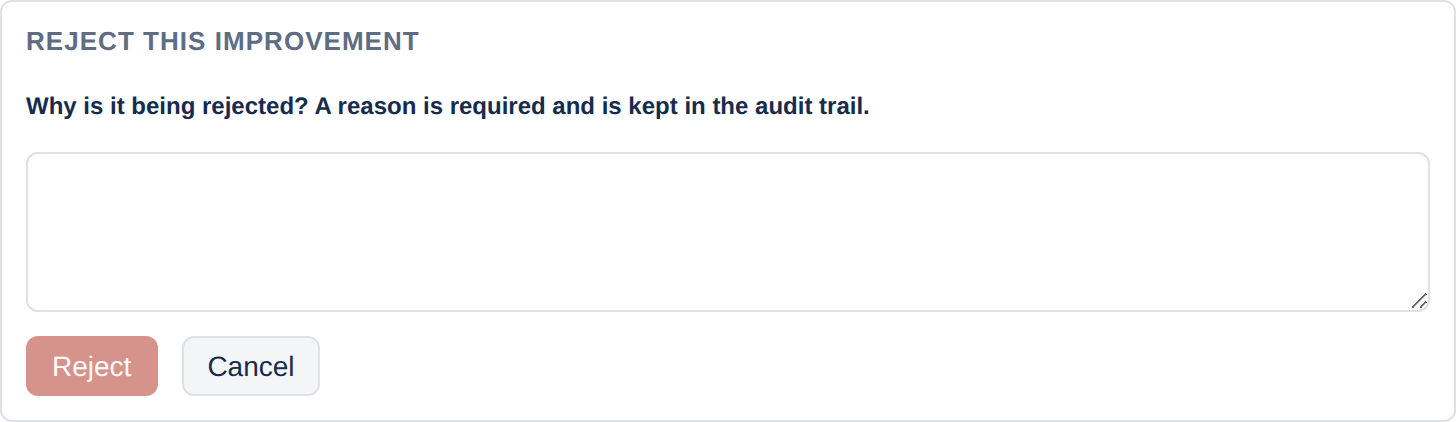
The Reject button stays disabled until you have typed something. The reason is stored on the record and written into the audit trail, so six months later the register still answers "why did we not do this?".
If the improvement is later reopened, the rejection reason is cleared — a live improvement never carries a stale explanation of why it was turned down.
Reopening, and what it clears
Moving back from Implemented or Verified to In progress clears the completion timestamps downstream of where you land. If a record was implemented on 30 March and verified on 13 April, sending it back to In progress removes both stamps.
This is what stops a record ever showing a verification date earlier than its implementation date, which is the first inconsistency an auditor spots. It also means the dates you see are always the dates of the current pass through the lifecycle. The full history is in the audit trail.
The gates
Three things can stop a transition. The first two are project policy; the third is always on.
| Gate | Applies from | What it wants |
|---|---|---|
| Owner required Optional | Approved onwards | An owner on the record. |
| Benefit case required Optional | Approved onwards | Either a forecast benefit figure or a written narrative. |
| Evidence before verification Always | Verified | Either a realised benefit figure or at least one measure. |
Because the first two apply from Approved rather than at Approved, you cannot satisfy a gate, move past it and then strip the field out. Any later transition checks it again.
What gets recorded
Every transition writes an audit event carrying:
- a sequence number, unique and increasing within that improvement;
- the date and time;
- who made the move;
- the fields that changed —
status, and any timestamps stamped or cleared; - the rejection reason, where there is one.
See Comments and the audit trail for how to read it.